
Sharing Lost Reports with Web Users
Scenario
You need to configure a SharePoint site integrated with Reporting Services for Internet access. In our case, the end users would authenticate with Windows security by using local Windows account created on the web server.
Issues
Report URLs reference the machine NetBIOS name and fail to execute with “The path of the item ‘<path’ is not valid. The full path must be less than 260 characters long; other restrictions apply”. Same happens when Report Builder tries to load models.
Solution
This one took a few hours to solve:
-
Since Reporting Services 2008 only supports access from SharePoint URLs in the default zone, change the public URL of the default zone (SharePoint 3.0 Central Administration -> Operations -> Alternate Access Mappings) to the web server Internet URL, such as http://www.adventure-works.com/.
This will take care of the report URLs which now should include the server Internet address. However, requesting reports would result in rsItemNotFound errors although the report URLs look perfectly normal.
-
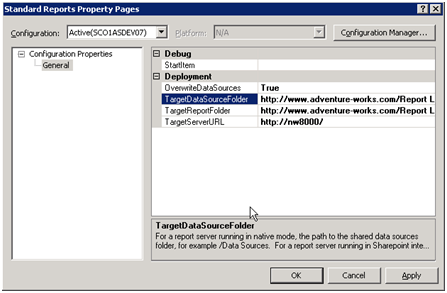
Open the report project in BIDS. In the project properties, change the TargetDataSources and TargetReportFolder settings to include the server Internet URL instead of NetBIOS names, such as http://www.adventure-works.com/Report Library/Shared Documents/Data Sources for the TargetDataSource setting.

- Redeploy the report definition.
At this point, standards reports deployed to SharePoint should work. If you use local server accounts for your users, however, previewing reports in Report Builder may fail with mysterious errors about invalid semantic queries. You can solve this issue by making sure that the user logon and server accounts are identical, that is, have the same name and password.


